 July 2026
And Why
Welcome to the August 2026 issue of Ken’s Korner Newsletter

It is obvious now, that going forward, wireless systems are going to be the mainstay for device connectivity. However, there will still be a need for cables for the foreseeable future. (That timeframe is getting shorter in the modern world.) especially for people who don’t have Internet access or want a stable, simple and more secure connection for their devices.
- Flash drives you don't own
- Wet, dirty, or rusted accessories
- Counterfeit cables and chargers
- Power hungry gadgets
- Unpowered USB hubs with multiple connections
In the past most devices used a different cable for charging and a different cable for data transfer. Advancements in technology have made it possible for the USB port to do both these functions efficiently. While many ports have come and gone even the really thin laptops and tablets still have USB ports. They are still essential for users who rely on a lot of peripherals.
Due to the efforts of active legislators, largely from the European Union, many technology companies have committed to the standardization of USB-C systems in devices. However, just because you can physically plug a lot of things into these ports.
Flash Drives that you don’t own
First on the list of things that you should not plug into your laptop are Flash Drives that you don’t own. A lot of people just assume that flash drives are for storing things. It’s true that is one of the things that flash drives do but you can do a lot more than just store stuff on a flash drive. With the right software and configuration, you can use a USB drive for a host of different jobs such as:
- Being an off-line password manager.
- Portable operating system.
- Storage for portable apps and programs.
- A digital key for your PC.
- A performance boost for older laptops.
The logic behind the last one is that new computers often have a solid-state drive instead of the old hard disk drive because they are faster, smaller and noiseless. You can increase the performance by storing files on the USB drive. All you need is a USB drive with at lease 500 MB of storage capacity.
But they can also carry some unwanted problems like viruses and other malware or malicious scripts that can take over your laptop. See the article in Wired magazine about how Chinese Spies Infected Dozens of Networks With Thumb Drive Malware back in 2023.
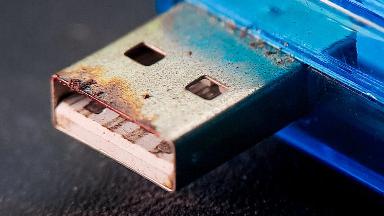
As a general rule it is best to avoid buying used USB drives. It is possible to test a used USB drive using an old computer or a cheap computer such as the Raspberry PI. Make sure to disconnect the device from your network to avoid potential network attacks.
Wet, dirty, or rusted accessories
Really! Like you must be told about this? It may seem crazy, but I see it all the time. Usually with a caveat something like, “but I have all my pictures on there”. (Have I mentioned backups?) Unlike mobile phones laptop computers are designed to be used indoors on a flat stable surface. If you plug in a damaged device it could end up damaging the port on your computer. It is a dirty world out there so some dirt will always find a way in. If you spot some corrosion or dirt in small amounts, you can often clean the port yourself. I try not to use the compressed air for this. You might just push the problem farther into the device. I recommend a vacuum cleaner instead. You can also use WD 40 Contact Cleaner which was specifically designed for cleaning electrical components.
If you live a more intense lifestyle there are some “military grade” laptops out there that are a little more ruggedized that the average laptop. But you should take the term military grade with a grain of salt. The testing process can be inconsistent and things like dust-proof and waterproof can deteriorate over time. The US military does have some very robust hardware. But I’ll bet they also have a larger budget allowance than you do.
Counterfeit cables and chargers
Most laptops, tablets and other devices come with a charger when you buy them. These are designed to work with your new device and are often specially constructed for optimal performance. Not to mention that they will also be covered by the manufacturers’ warranty.
Originally all USB devices, (1.0 and 2.0) had the same five volts at five hundred milliamps for a two and one-half watts max charging rate. Now different USB devices have a wide range of voltages and wattage ratings. When they are first plugged in modern devices and the chargers communicate with each other to find the fastest and safest charging settings. These days almost everything has some form of fault protection so that even if you could plug it in backward it would just go to sleep and not charge at all.
One of the most common faults with the brand X chargers is the lack of adequate insulation. In some of the worst cases, they are just a little fire hazards waiting to happen. If your charger is lost or non-functional or you just want a second unit to keep at the office, it is best to get a new one from the manufacturer of your device. Whenever possible, try to buy one from a reputable source that is approved by the manufacturer with all the necessary certifications for the regions where they are selling them.
Power hungry gadgets
While they may use the same USB cables or at least, they look the same, some devices are designed to be plugged into an AC socket via a charging brick for a reason. Usually that is because they require things like higher wattage or stable current. Even the new devices with the Thunderbolt USB ports or the USB-C (PD) ports can only supply a limited amount of power. It is a computer after all, not a UPS. Unless it is specifically marketed as a USB powered gadget it is better to fail on the side of discretion and just plug it into the wall.
Unpowered USB hubs with multiple connections
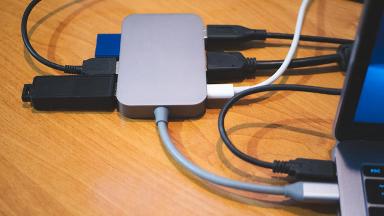
This is very close to the same thing as the power-hungry gadgets section. The main difference is that by itself or with just a few of the ports being used at one time then it is not such a problem. Only when people start loading up all the ports and using them all at the same time or using power hungry devices at the other end of the cable like some cameras and printers then it becomes a power hunger device. With older equipment this could actually damage the USB port by trying to draw too much current from the old USB port.
The fix is easy. Get a powered USB hub. It may not be very mobile but then how often does the user actually try to print something from the bench in the park?
See the original article from Slashgear at, https://www.slashgear.com/1978687/gadgets-to-never-plug-into-laptop-usb-ports/
If you know someone that you think would enjoy this newsletter, share it with them and ask them to join using the link at the bottom of the page.
And remember — always back it up!